 Drive DTC
Digital inspections
Record the walk-around as Good, Wearing or Needs work with measurements, and print it with the customer's report.
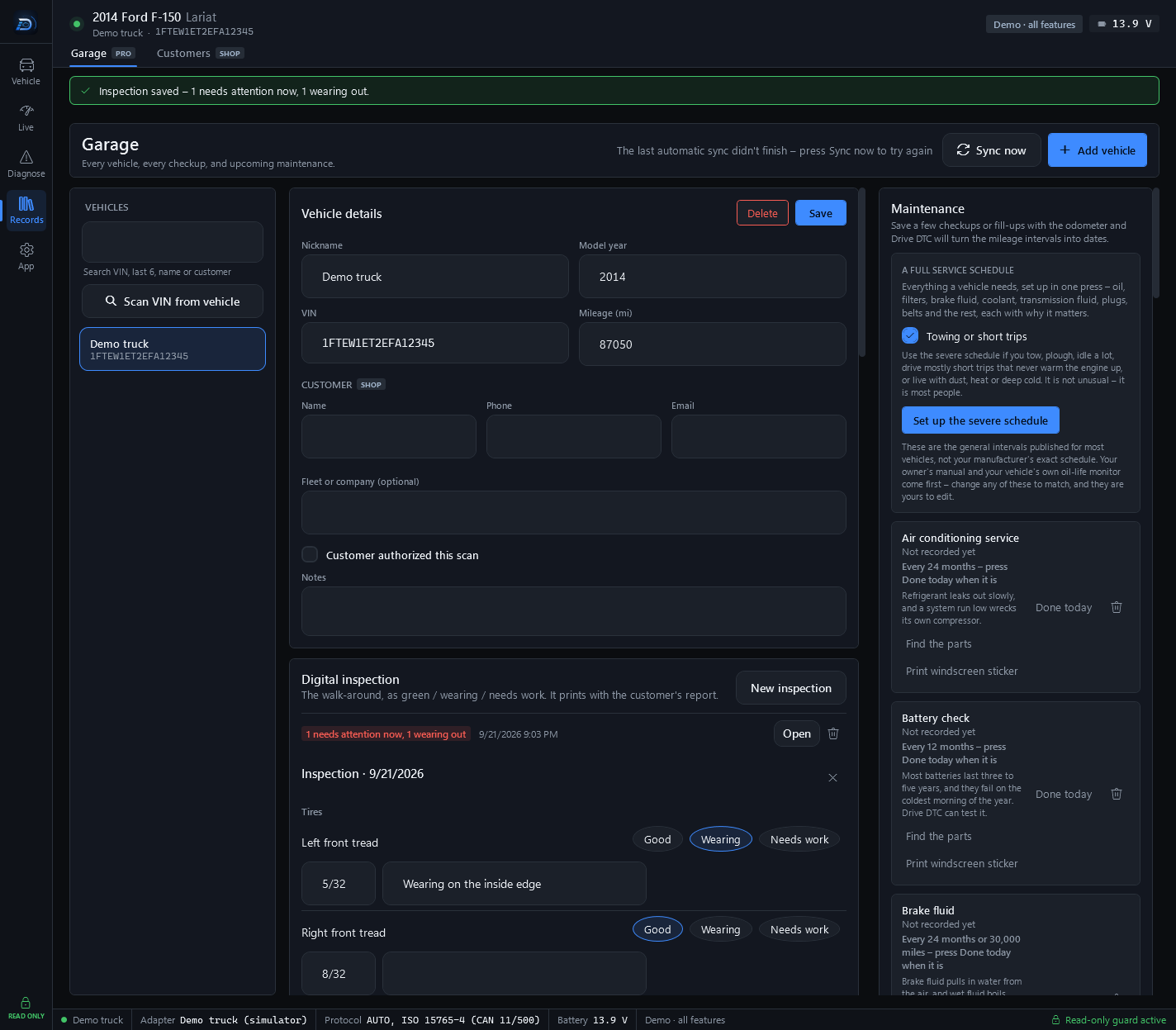
A digital inspection is the walk-around, as green / wearing / needs work. It prints with the customer's report and shows on its share link. Inspections are part of Drive DTC Shop.
Do an inspection
- In the Garage, select the vehicle and find Digital inspection.
- Press New inspection.
- For each area, tick Good, Wearing or Needs work.
- Add a measurement where there is one, for example 6/32 or 4 mm, and a note for the customer.
- Enter the technician's name and press Save inspection.
Saved inspections are listed under Digital inspection. Open shows one again and the bin icon deletes it.
On the report
The customer's report shows the inspection as a traffic-light table by area with the measurement and note, a headline, and "checked by" with the technician's name. See Save, print and share a report.
How much is left
Measured at inspections. Two of them far enough apart say how fast it is wearing, and that says how much longer it lasts. The How much is left panel in the Garage shows each measured item with its latest reading and an estimate of the time left.
Note: An inspection records what the technician saw on the day. It does not certify the vehicle as roadworthy, and it is not a substitute for a safety or emissions inspection.
Last updated
Was this helpful?