 Drive DTC
Used-car check and buyer report
Plug into a vehicle you are thinking of buying and look for recently cleared codes, open faults and misfires.
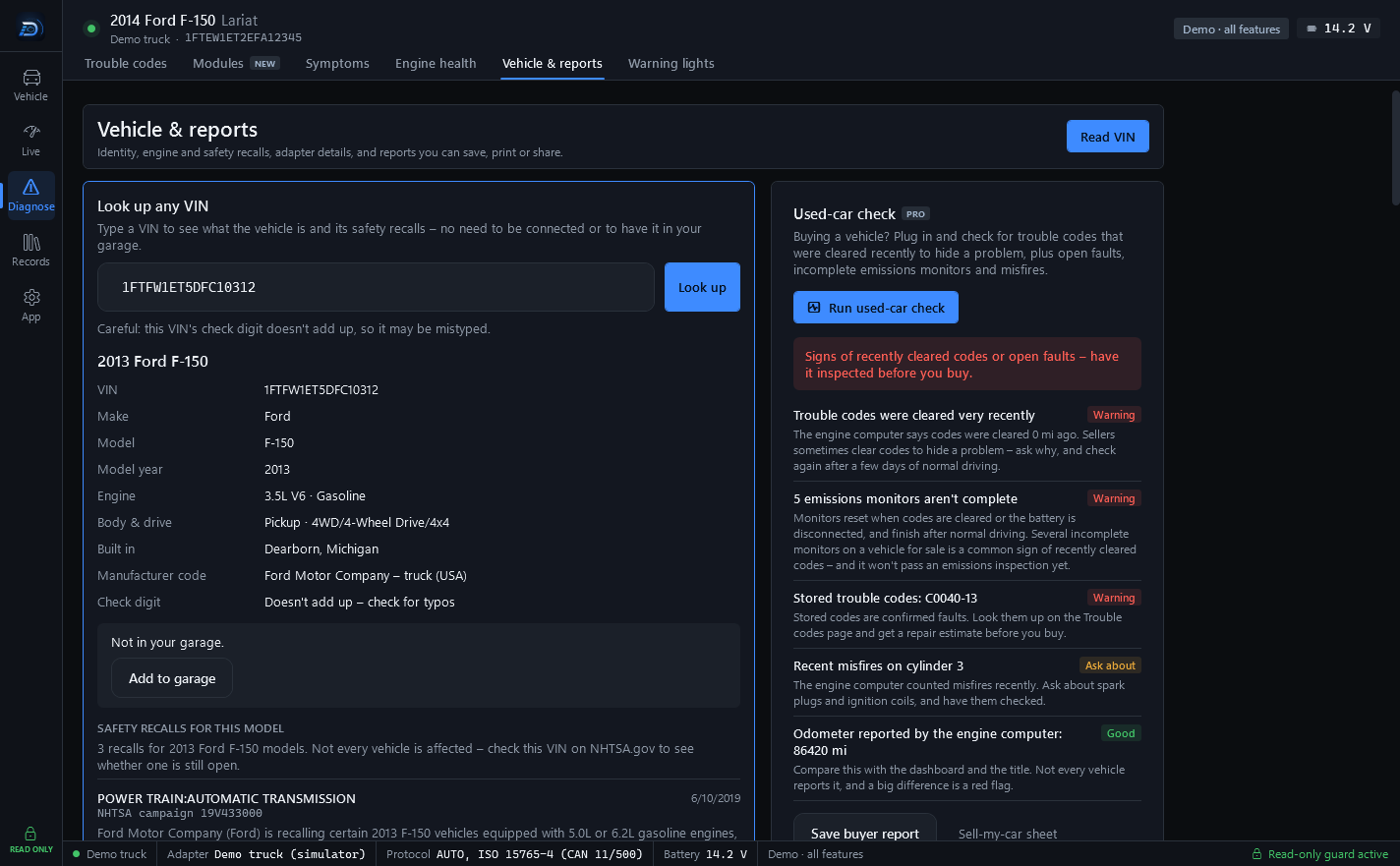
Buying a vehicle? Plug in and check for trouble codes that were cleared recently to hide a problem, plus open faults, incomplete emissions monitors and misfires. The Used-car check is part of Drive DTC Pro.
Run it
- Connect to the vehicle with the seller's permission. The first-time confirmation asks you to tick that you have it.
- Go to Diagnose → Vehicle & reports.
- Under Used-car check press Run used-car check.
What you get
- A verdict at the top.
- Findings, each marked Warning, Ask about or Good.
- Signs of cleared codes: distance and warm-up cycles since codes were last cleared, incomplete monitors, and how far and how long the vehicle has been driven with the light on.
- The odometer as the engine computer reports it, so you can compare it with the dash.
- Trouble codes and recalls for the model.
Save it or hand it over
- Save buyer report keeps a copy for yourself.
- Sell-my-car sheet is the same check from the seller's side, with your service history and a QR code buyers can scan to see the report live.
Warning: This can't find every problem, like accident or flood damage. Always get a pre-purchase inspection from a qualified mechanic.
Last updated
Was this helpful?