 Drive DTC
Product overview
Read the vehicle. Keep the record. Hand the customer the paperwork.
Drive DTC is one Windows app. A USB OBD-II adapter reads your Ford, Lincoln or Mercury; the app turns what it says into plain English, a 0–100 health score and a report. Pro keeps every checkup per vehicle. Shop puts your name on the report and sends the customer an estimate to approve on their phone.
One app
From the port to the paperwork
Seven steps, each built on the one before it. The first five are free. Pro keeps the record. Shop hands it to a customer.
Adapter
A USB ELM327-compatible OBD-II adapter – OHP ELMconfig, OBDLink SX or vLinker FS – in the port under the dash and a USB port on your Windows PC. Drive DTC finds its COM port by itself.
USB · ELM327Vehicle
Reads the VIN and checks its check digit, looks up the exact model and engine at NHTSA, and lists the safety recalls for that model.
FreeCheckup, codes and live data
One button reads codes, readiness monitors, misfire counts and battery voltage in about ten seconds. Trouble codes come in plain English with what to check first; live data shows 35+ values on gauges.
Free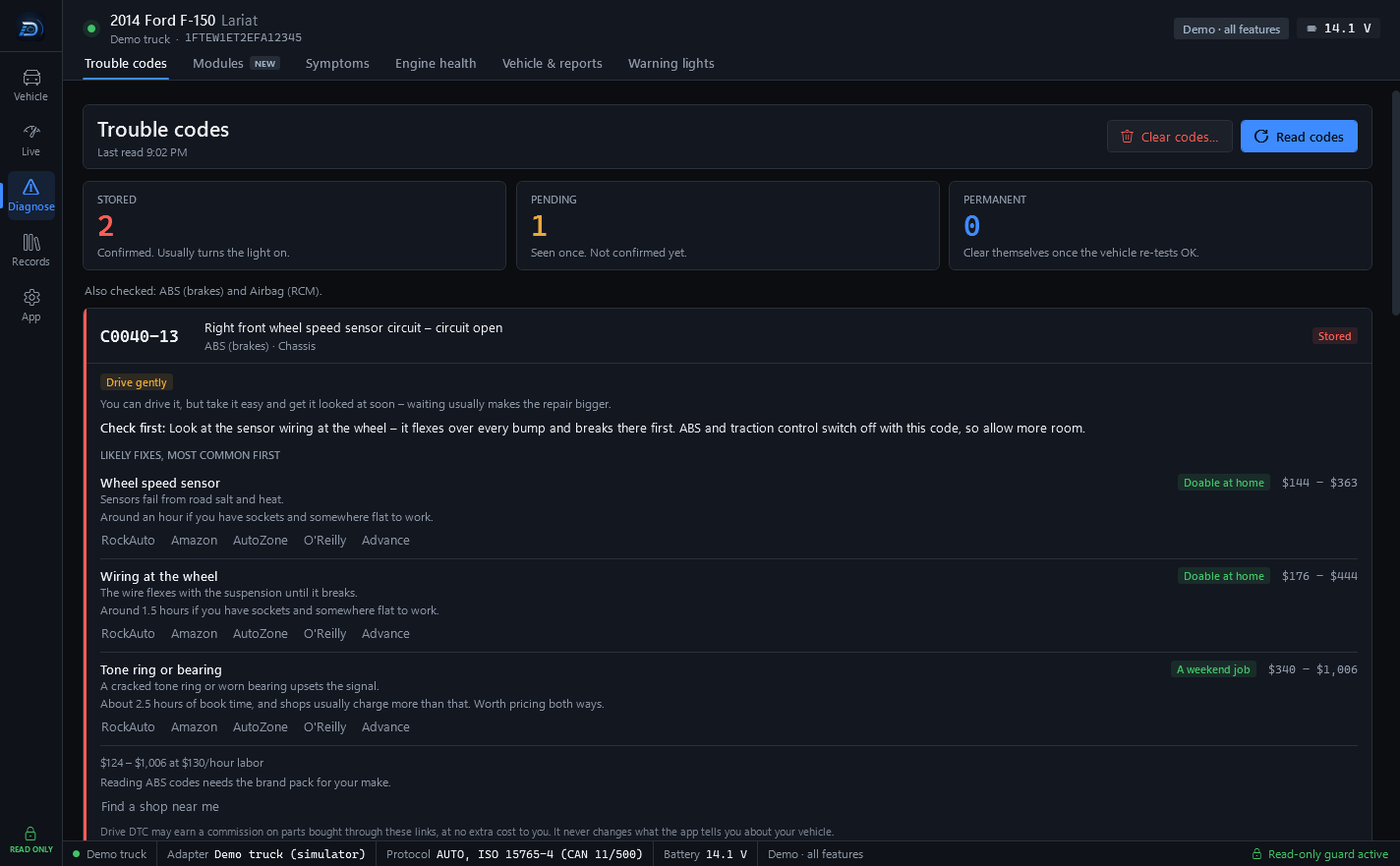
Step 3. A code, what it means, what to check first, and the likely fixes in order with typical cost ranges at your labor rate.
Health score and verdict
Everything the checkup found, summed into a 0–100 score with the deductions listed, a whole-vehicle verdict, and a what-to-do-next list, worst first. A quick summary, not a diagnosis.
FreeReport
Every checkup can become a report that opens in any browser: vehicle, score, codes, readiness, misfires and your notes. Free makes HTML. Pro adds PDF, print and share links that work for 30 days.
Free · Pro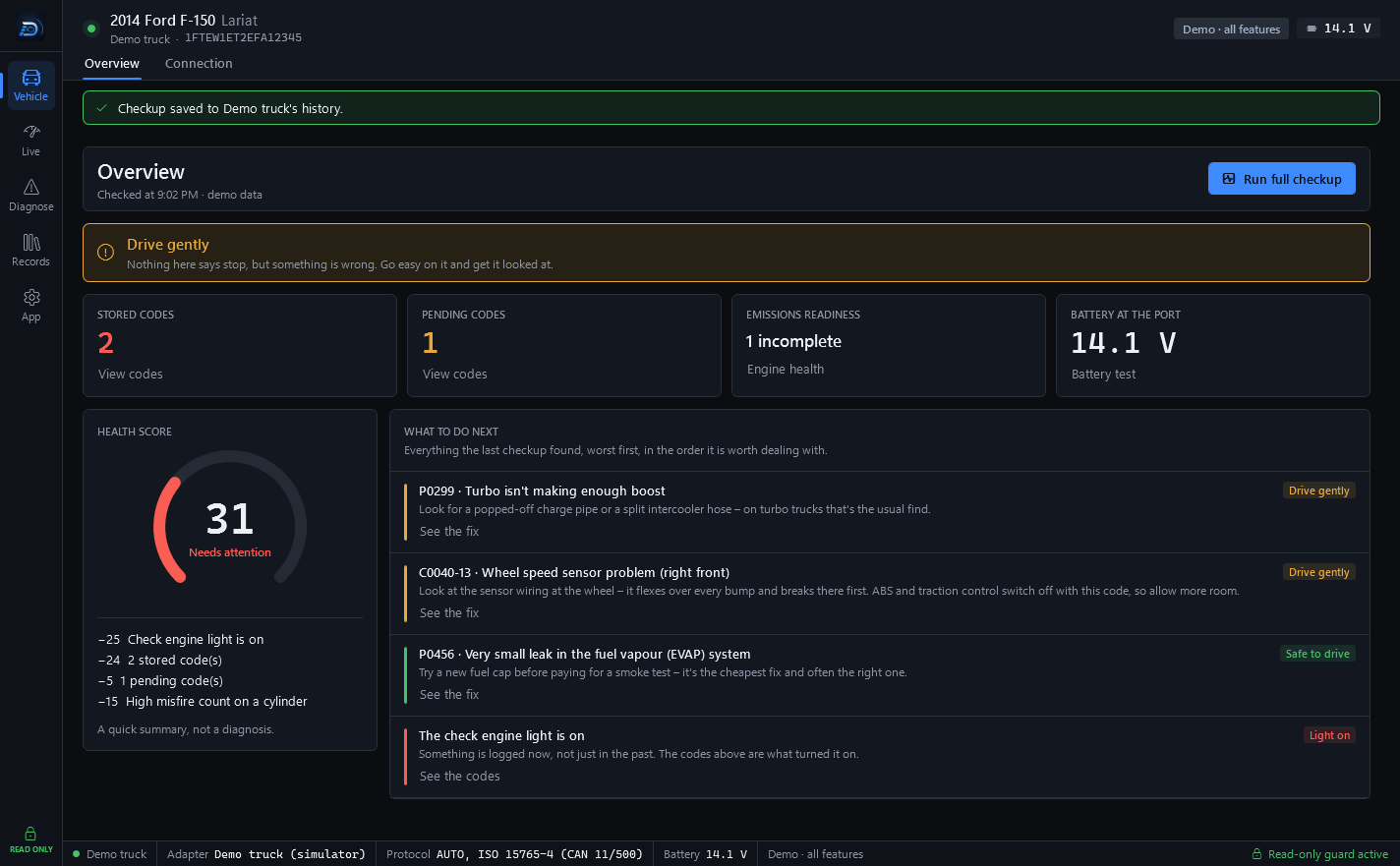
Step 4. The score, why it is what it is, and the order worth dealing with things in.
Garage history
Every checkup saved per vehicle, so the next one has something to compare with.
- Before/after compare and maintenance reminders
- A fuel log, photos and receipts
- Sync between your computers, encrypted on your PC first
Shop: customer and estimate
The report carries your shop's name and logo, and the customer gets a say.
- Customer details on each vehicle
- An estimate the customer approves on their phone
- Email the report from the Garage, with your coupon on it
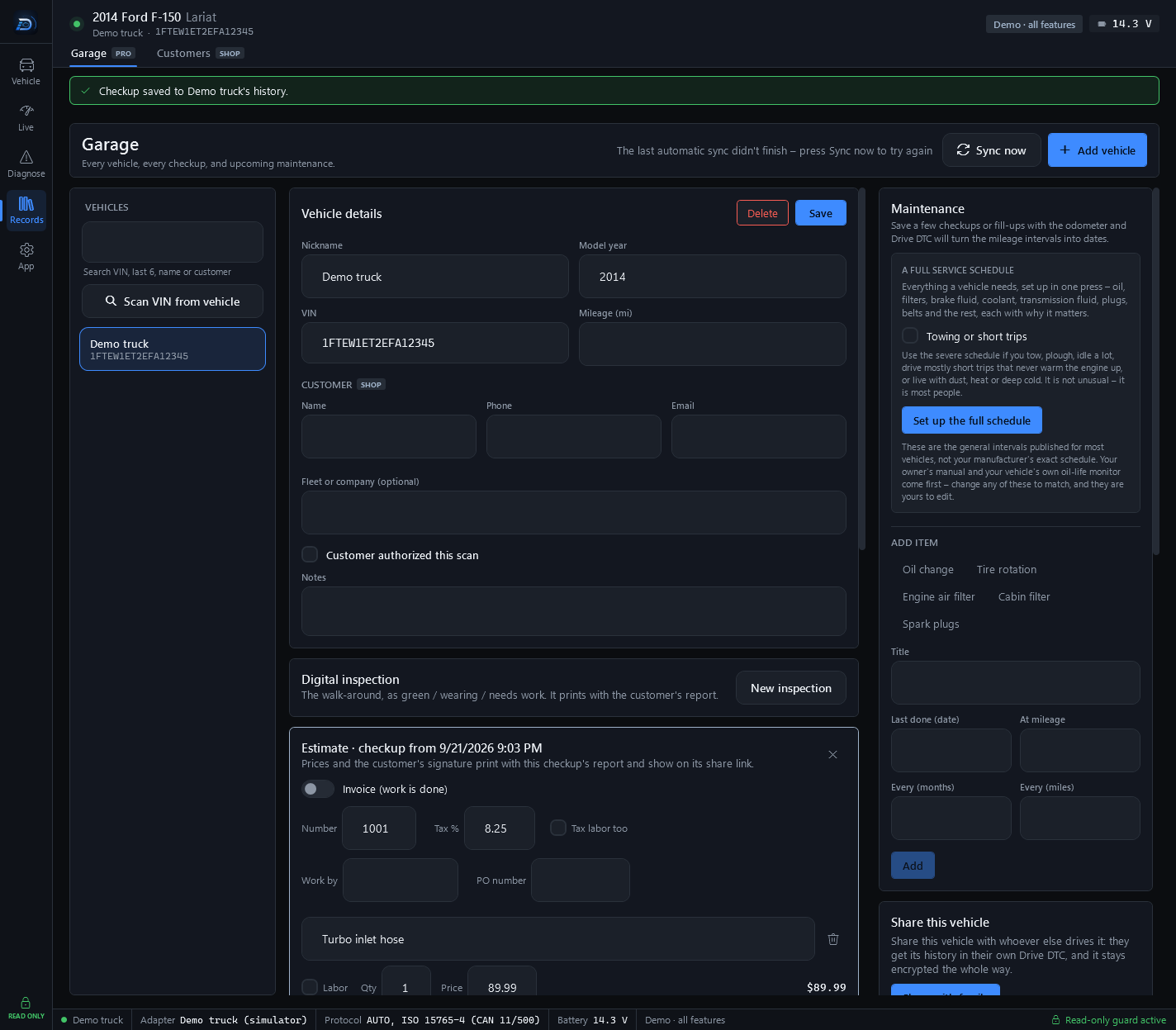
Step 7. Customer fields on the vehicle and an estimate written against a checkup. Prices and the customer's signature print with the report and show on its share link.
Diagnostics
What the vehicle tells you
Every card below is a read. The vehicle is asked a standard OBD-II question and the answer is shown in plain English, with the raw value in a monospace face so a code or a part number reads the same every time.
Live data
RPM, speed, boost, temperatures, fuel trims and more – 35+ values on gauges and tiles, each with a small trace. Record a drive to CSV and replay it as charts.
Service 01
Freeze frame
The readings from the moment a code set – what the engine was doing when the light came on.
Service 02
Trouble codes
Stored, pending and permanent codes, each in plain English with what to check first, likely fixes in order and typical cost ranges. Clearing engine codes asks you to type CLEAR.
Services 03 · 07 · 0A
Readiness
Each emissions monitor and whether it has completed, with drive-cycle hints for the ones that haven't – plus what the vehicle reports about passing an emissions test. Not an official result.
Service 01
Misfire counts
Counts per cylinder, recent average and current trip, on 2008-and-newer CAN vehicles. Self-test results show how close the catalyst, oxygen sensors and EVAP are to their limits.
Service 06
Battery
Voltage at the OBD port on every checkup and at the top of every screen. Pro grades resting, cranking and charging voltage in a battery and charging test.
ATRV
Vehicle information
The VIN, checked against its check digit, then decoded by NHTSA into the exact model, engine and the safety recalls for that model.
Service 09
Modules scan New
A network scan of every module on the bus: what each one says about itself and which codes it holds, with their status bits.
Service 19
Ford values
Transmission fluid temperature and the four tire pressures, shown only when the vehicle answers – plus ABS and airbag codes from their own modules. With the Ford pack.
Service 22 · Service 19
Older 1996–2007 vehicles answer the standard questions: trouble codes, live data, freeze frame and readiness. Misfire counts and Ford values need a 2008-or-newer CAN vehicle. The full list of what is allowed and what is refused is on the app's Safety screen.
What you keep Pro
A record of every checkup
Pro keeps what the vehicle said, so the next checkup has something to compare with – on your computer, and between your computers if you turn sync on.
- Garage. Every vehicle you scan, with its checkup history, a fuel log, photos and receipts.
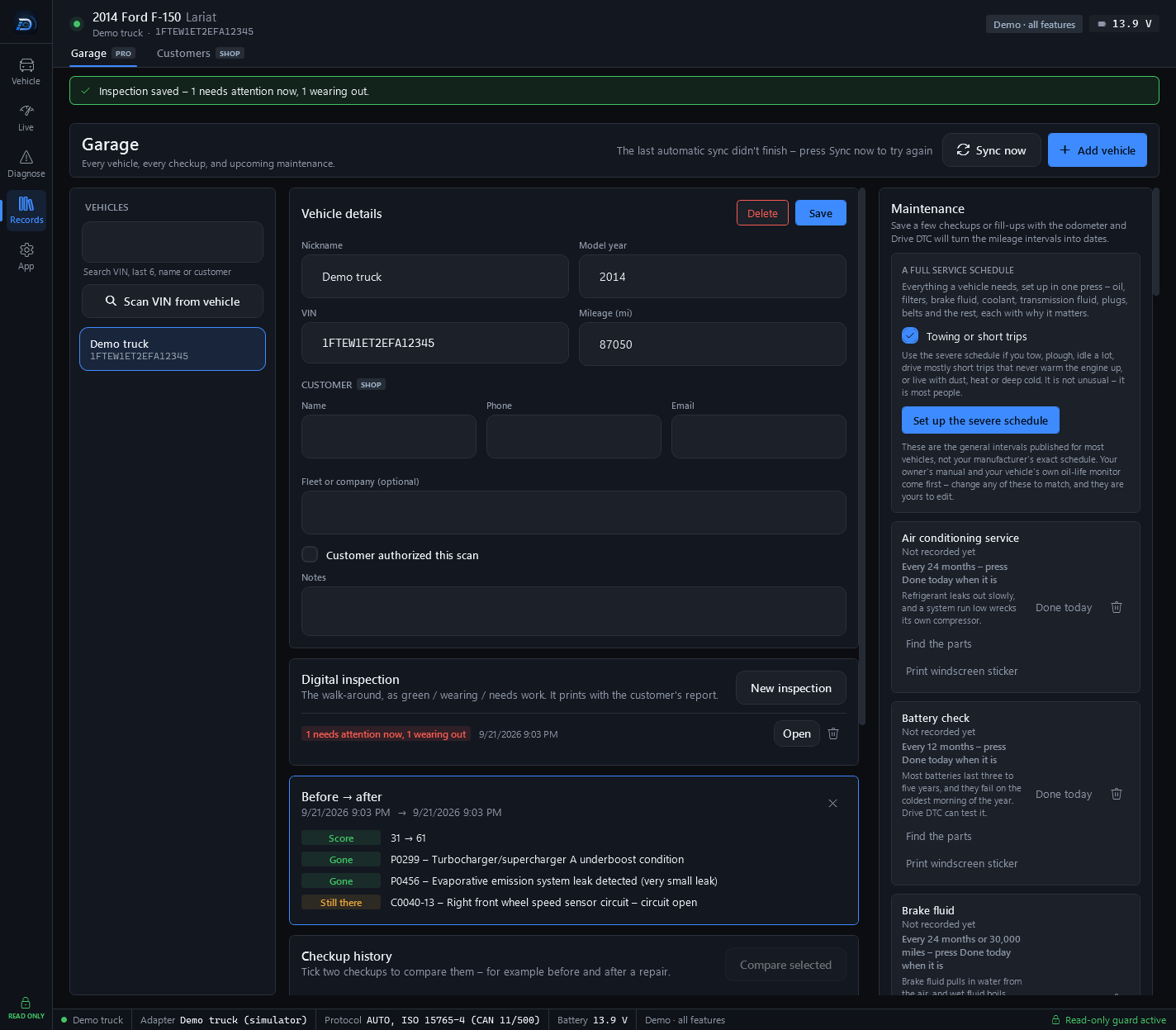
- Before and after. Tick two checkups and see how the score moved and which codes are gone, new or still there – for example before and after a repair.
- Maintenance. Save a few checkups or fill-ups with the odometer and the mileage intervals turn into dates. A full service schedule is set up in one press, with a severe schedule for towing and short trips.
- Share links. A read-only report link for your mechanic or your buyer. It works for 30 days.
- Cloud sync. Your garage is encrypted on your PC before it is uploaded, and your recovery key is shown once. Photos and receipts stay on your computer.
For the customer
What a customer receives
Two pages reached from a link, in any browser. Nothing to install and no account. Both are sealed on your computer before they leave it; the key travels after the # in the link, a part of the address browsers never send to a server.
Shared vehicle report Pro
A share link opens a read-only snapshot of one checkup. It works for 30 days, and the page shows:
- The vehicle: name, VIN, model year, mileage and the battery voltage at the OBD port
- The health score out of 100, with the same label the app shows
- Trouble codes – code, status, module and description – or “No codes”
- Emissions readiness and misfire counts per cylinder
- Your notes on the scan
- From a shop: your branding, the inspection, the estimate or invoice with the customer's signature, and your coupon Shop
The page ends with: “Shared from the Drive DTC app. Reports are read-only snapshots for information only and expire automatically.”
Approve this estimate Shop
The customer sees your shop's name and contact details, the vehicle, each line of work with its quantity and amount, parts and labor, tax and the total, any notes, and your coupon if you sent one. They type their name, add a note if they want, and press “Approve this work” or “Not yet – I have a question”. Their answer goes straight back to the shop, with the time they gave it, and the page then shows Approved or Declined.
The page ends with: “Sent from the Drive DTC app by the shop named above.”
Where the shop's part comes from
In the Garage, a shop adds what a customer's report needs beyond the scan. All of it prints with the report and shows on its share link.
- Digital inspection. The walk-around, each area marked Good, Wearing or Needs work, with a measurement and a note.
- Estimate or invoice. Each line of work, parts and labor, tax and the total, who did the work, and the customer's signature once they approve.
- Coupon. Your offer, its code and the date it is good through, in a dashed box at the end of reports and estimates until that date passes.
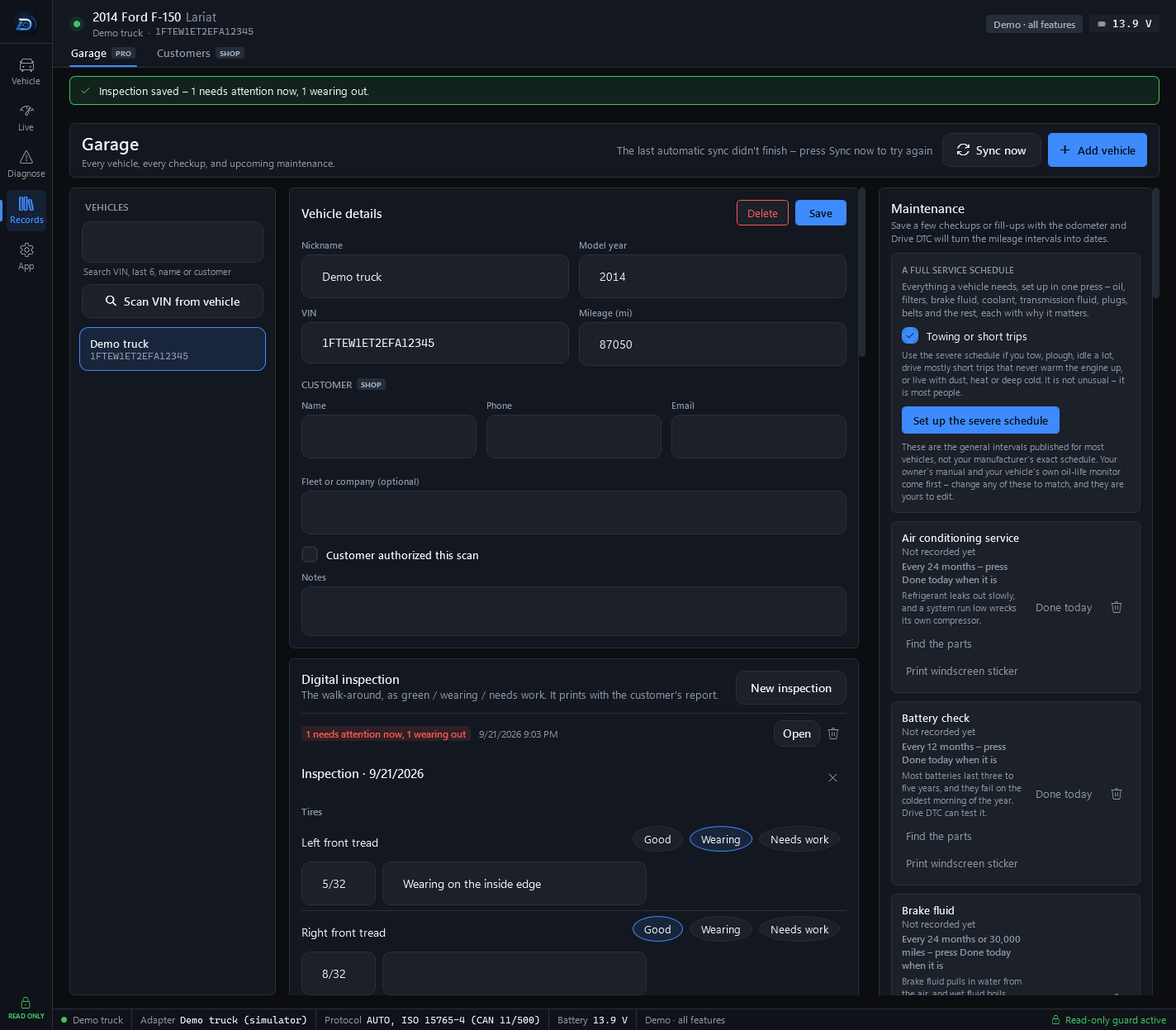
An inspection in progress on the demo truck. The saved one above it reads “1 needs attention now, 1 wearing out”.
Read-only by design
Every message to your vehicle passes a built-in safety guard. Anything that isn't a read is refused in the code – there's no hidden setting to turn it on.
Which plan
Which plan does what
Everything up to the HTML report is free. Pro and Shop are one-time purchases through the Microsoft Store – no subscription.
Free
The checkup and score, trouble codes on any brand, freeze frame, live data with recording and replay, readiness and misfire counts, the modules scan, vehicle details and recalls, and HTML reports. A demo vehicle unlocks every feature so you can try the rest.
For driversPro One-time
Garage, history and before/after compare, maintenance, PDF reports, cloud sync and share links – plus the Towing screen, custom alerts, performance timers and fuel economy, and the battery and charging test.
PricingShop One-time
Everything in Pro, customer details on each vehicle, reports branded with your shop, emailed reports, a customer coupon, estimates a customer approves on their phone, a Customers page, and every brand pack included.
For shopsStart with a checkup.
Free to start, read-only by design, and made for Ford owners and shops.