 Drive DTC
Adapter not found or no COM ports
What to check, in order, when Find adapter and connect cannot see your adapter or the connection fails.
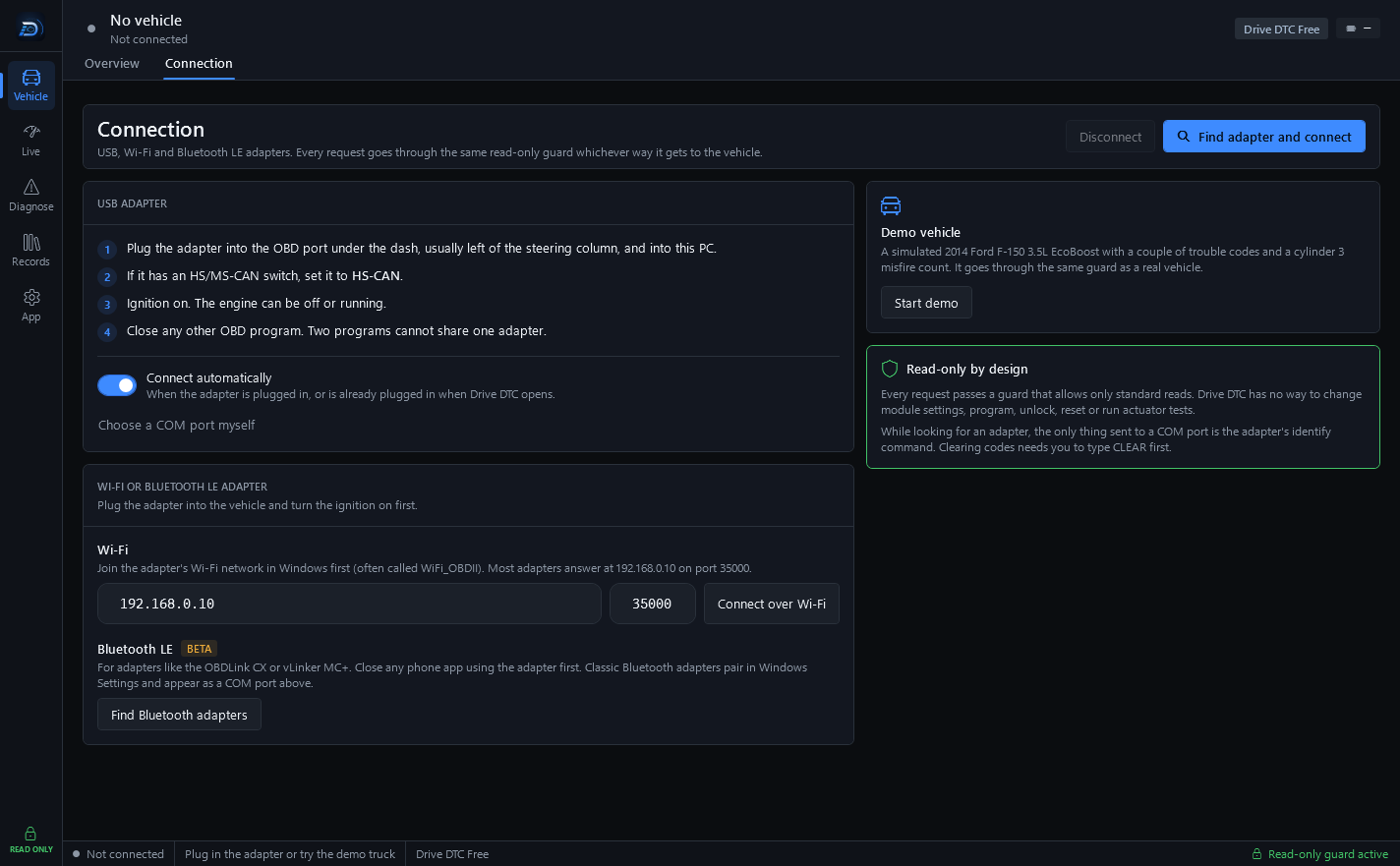
Most connection problems are one of five things: a missing driver, the ignition off, the wrong CAN switch position, another program holding the adapter, or a slow clone. Work down this list on the Connection page (Vehicle → Connection).
No COM ports found
- Install the adapter's USB driver (FTDI, CH340 or CP210x) from the adapter maker.
- Plug the adapter in again, ideally into a different USB port or with a different cable.
- Press Choose a COM port myself, then Rescan. Your adapter should now appear with its port name and type.
The port is there, but it will not connect
- Ignition on. The engine can be off or running, but the vehicle has to be awake.
- If the adapter has an HS/MS-CAN switch, set it to HS-CAN. The OHP ELMconfig needs this.
- Close any other OBD program. Two programs cannot share one adapter.
- Pick the port yourself and press Connect to this port.
- Turn on Be patient with a slow adapter under Settings & plan → Windows. Cheap ELM327 clones answer late and drop frames. This waits more than twice as long before calling a read a failure – scans take longer, but they finish. Try it before believing an adapter is broken.
Bluetooth
- Classic Bluetooth: pair the adapter in Windows Settings first. It then shows up as a COM port on the Connection page.
- Bluetooth LE (beta): close any phone app using the adapter, plug it into the vehicle with the ignition on, then press Find Bluetooth adapters.
Wi-Fi
Join the adapter's Wi-Fi network in Windows first (often called WiFi_OBDII). Check the address and port match the adapter's label, then press Connect over Wi-Fi. While you are on the adapter's network your PC usually has no internet.
Connect automatically
With Connect automatically on, Drive DTC connects when the adapter is plugged in, or is already plugged in when Drive DTC opens. If it does not, press Find adapter and connect once by hand.
Still stuck
Send a message from App → Help & support with Include diagnostics left on. That adds the app version, connection details, recent codes and adapter log (never your VIN), which is usually enough to see what the adapter is doing. See Contact support and send diagnostics.
Last updated
Was this helpful?